

Skip to content
Menu
3Doodler
3D LESSONS 3D TUTORIALS 3D STENCILS DEALS
Search
3D LESSONS 3D TUTORIALS 3D STENCILS
SUPPORT
Discover

What is a 3D Pen?How to use a 3D penHow to draw with a 3D penDrawing 3D art with a 3D pen

Get Started

Start+FlowCreate+CandyChefPRO

Troubleshooting

Start+FlowCreate+CandyChefPRO

Manuals

Start+FlowCreate+CandyChefPRO

Resources

TutorialsStencilsLessons

Help

FAQsCompatibility

Schools

Learning PacksLessonsProfessional DevelopmentAccessibilityPurchase Orders

Blog
SHOP
USA UK International
DEALS

Search

Commonly searched

  • 3D Pens
  • 3D Pen Refills
  • 3Doodler Start+ Essentials 3D Printing Pen Set

    3Doodler Start+ Essentials 3D Printing Pen Set

  • 3Doodler Flow Essentials 3D Printing Pen Set

    3Doodler Flow Essentials 3D Printing Pen Set

  • 3Doodler Chef 3D Pen Set

    3Doodler Chef 3D Pen Set

Cart

3D Pen Support

Start+ 3D Pen

Start+

4
  • Start+ Getting Started Guide
  • Start+ Troubleshooting & FAQs
  • Start+ Manuals
  • Start+ Video Tips
Flow 3D Pen

Flow

3
  • Flow Getting Started Guide
  • Flow Troubleshooting Guide
  • Flow Manuals
PRO 3D Pen

PRO

3
  • PRO Getting Started Guide
  • PRO Troubleshooting Guide
  • PRO Manuals
Chef 3D Pen

Chef

3
  • Chef Troubleshooting Guide
  • Chef Getting Started Guide
  • Chef Manuals

Candy

3
  • Candy Getting Started Guide
  • Candy Troubleshooting Guide
  • Candy Manuals

Discontinued Pens

6
  • PRO+
    • PRO+ Troubleshooting Guide
    • PRO+ Manuals
    • PRO+ Getting Started Guide
  • Create+
    • Create+ Getting Started Guide
    • Create+ Troubleshooting Guide
    • Create/Create+ Manuals
View Categories
  • Home
  • Support
  • Candy
  • Candy Troubleshooting Guide

Candy Troubleshooting Guide

2 min read

Troubleshooting your 3Doodler Candy

How do I find my pen’s serial number?

Solution:
You can find your pen’s serial number by removing the Hatch and looking inside the opening where it sat. To remove the Hatch, pull the Pushrod back, then pull the Hatch downward. Refer to the image below:
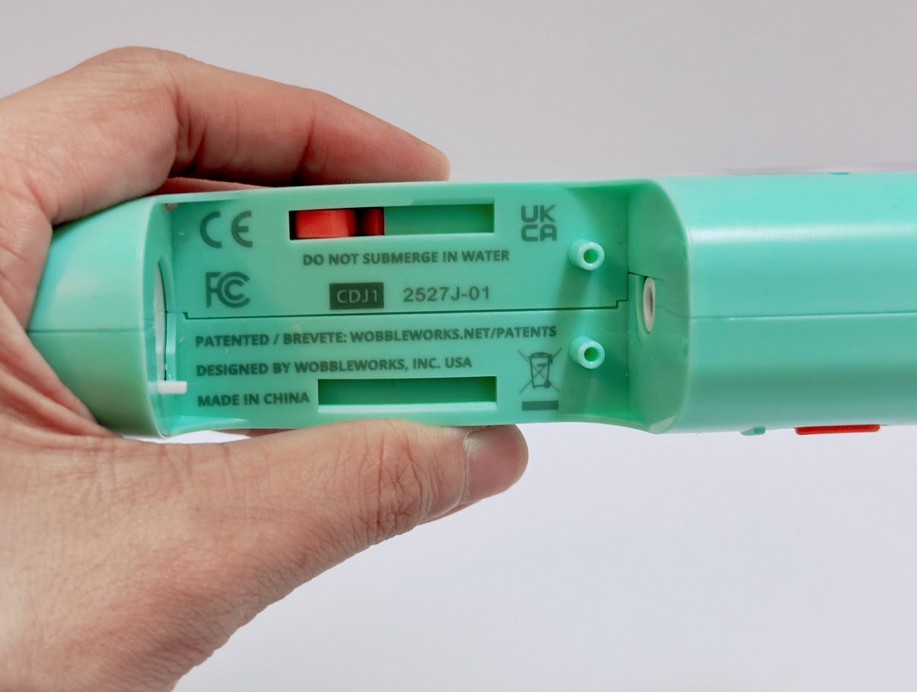
Candy Serial Number

Why won’t my Candy Pen extrude a Candy Capsule, even though it’s turned on?

Solution:
Clean the nozzle every time you turn off the pen and before powering it on again. Hardened candy can clog the nozzle even if you power off for just a few minutes. The residual capsule can solidify and block extrusion.

To clear the clog:

  • Remove the nozzle and capsule as instructed in the user manual.
  • Soak the nozzle tip in warm water for fastest results (cold water works too).
  • Never submerge the entire device—only sponge or cloth-wash the exterior.
  • Dry completely before reassembling and powering the pen back on.

My Candy Capsules are broken. Can I still use them?

Solution:
Yes, as long as the pieces fit easily into the chamber and don’t exceed the length of the tube, they’re safe to use.

What happens if a Candy Capsule breaks inside the pen?

Solution:
You can try applying gentle pressure on the Pushrod to help the capsule engage and begin extruding. If that doesn’t work, disassemble the pen, clean out any broken pieces, and start again.

How will I know when to add more Candy Capsules?

Solution:
You’ll know the chamber is empty when you no longer see the silver metal rod on the Pushrod. If any part of the silver rod is still visible, there’s still candy inside the pen and you don’t need to add more yet.

How long does it take for the candy to harden?

Solution:
The candy hardens in 2-3 seconds, so it’s important to attach pieces of your creation quickly to ensure they adhere together before the candy dries. If it hardens before you finish assembling, simply add more extruded candy and try again.

Why are my Candy Capsules turning white?

Solution:
High humidity can cause isomalt Candy Capsules to turn white, but don’t worry—they’re completely safe to use and eat. This is a natural process called “blooming,” which happens when the Capsules absorb moisture from the air.

Still need assistance? Contact us

Updated on March 11, 2026

What are your Feelings

  • Happy
  • Normal
  • Sad

Share This Article :

  • Facebook
  • X
  • LinkedIn
  • Pinterest
Candy Getting Started GuideCandy Manuals
Table of Contents
  • Troubleshooting your 3Doodler Candy
    • How do I find my pen’s serial number?
    • Why won’t my Candy Pen extrude a Candy Capsule, even though it’s turned on?
    • My Candy Capsules are broken. Can I still use them?
    • What happens if a Candy Capsule breaks inside the pen?
    • How will I know when to add more Candy Capsules?
    • How long does it take for the candy to harden?
    • Why are my Candy Capsules turning white?
Subscribe For Special Offers & Inspiration
By subscribing, you agree to receive emails from us. Please find our privacy policy here.
Help
  • FAQ's
  • Troubleshooting
  • Warranty
  • Contact Us
Legal
  • Terms
  • Privacy Policy
  • Cookie Policy
  • Patents
  • Returns
  • Patents
  • All Other
Company
  • About
  • 3Doodler EDU
  • 3Doodler App
  • Blog
  • Press
Learn
  • Getting Started
  • Tutorials
  • Stencils
  • Videos
  • Lesson Plans
Payment methods
  • American Express
  • Apple Pay
  • Diners Club
  • Discover
  • Google Pay
  • Mastercard
  • PayPal
  • Shop Pay
  • Visa
  • Facebook
  • Instagram
  • LinkedIn
  • Twitter
  • YouTube
© 2026 3Doodler
Back to top